
Segway Launcher2.20.6 - Google Play
You'll be able to see results in few seconds.
Publisher Description
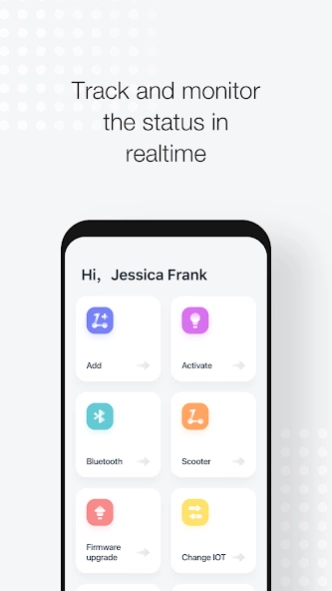


Launcher enables operators to manage scooter sharing business simpler than ever
Segway Launcher is an easy-to-use mobile application designed to help micro-mobility operators to start and operate scooter sharing business simpler than ever.
With Segway Launcher, you can launch, monitor and manage you fleet by yourself, cutting out critical time spent waiting on support teams, and eliminate the need for a desktop computer – as long as you have your mobile phone, you can use Launcher anytime, anywhere.
How Segway Launcher works
--Launcher empowers you to launch your fleet in three simple steps. Just unbox your scooters and download Launcher, scan the scooter’s QR code once to add, then again to activate.
--You can check scooter status, getting real-time updates on location, battery level and firmware info.
--You can also control scooters, locking and unlocking them, starting them, opening electronic battery lock covers, and more.
--Launcher lets you upgrade scooter firmware, proactively avoiding issues cause by outdated firmware.
Segway Discovery is a wholly owned subsidiary of Segway Ninebot, a global leader in micro-mobility solutions. Segway Discovery’s goal is to help entrepreneurs, corporations, and universities launch their own micro-mobility operations. No matter the size or location of your scooter fleet, our mission is to make shared micro-mobility simpler and more accessible to all.
About Segway Launcher
The company that develops Segway Launcher is Segway Discovery Inc.. The latest version released by its developer is 2.20.6.
To install Segway Launcher on your Android device, just click the green Continue To App button above to start the installation process. The app is listed on our website since 2023-03-22 and was downloaded 0 times. We have already checked if the download link is safe, however for your own protection we recommend that you scan the downloaded app with your antivirus. Your antivirus may detect the Segway Launcher as malware as malware if the download link to com.segwaydiscovery.blackhole.launcher is broken.
How to install Segway Launcher on your Android device:
- Click on the Continue To App button on our website. This will redirect you to Google Play.
- Once the Segway Launcher is shown in the Google Play listing of your Android device, you can start its download and installation. Tap on the Install button located below the search bar and to the right of the app icon.
- A pop-up window with the permissions required by Segway Launcher will be shown. Click on Accept to continue the process.
- Segway Launcher will be downloaded onto your device, displaying a progress. Once the download completes, the installation will start and you'll get a notification after the installation is finished.
Program Details
System requirements
Download information
Pricing
Version History
version 2.20.6
posted on 2023-03-22
Fix some known issues.
version 2.13.0
posted on 2022-05-07
Optimize user experience
version 2.12.0
posted on 2022-04-13
Added vehicle management for the new model S90L
version 2.10.0
posted on 2022-03-22
Increase the management and configuration of Bluetooth devices
version 2.9.0
posted on 2022-01-14
Optimize vehicle information display effect
version 2.8.9
posted on 2021-12-27
Modify battery display
Disclaimer
Official Google Play Link
We do not host Segway Launcher on our servers. We did not scan it for viruses, adware, spyware or other type of malware. This app is hosted by Google and passed their terms and conditions to be listed there. We recommend caution when installing it.
The Google Play link for Segway Launcher is provided to you by apps112.com without any warranties, representations or guarantees of any kind, so access it at your own risk.
If you have questions regarding this particular app contact the publisher directly. For questions about the functionalities of apps112.com contact us.
